
AI Agents Status Tracker
Making AI agents trustworthy by showing people what agents are doing, when they need a human, and what they finished.
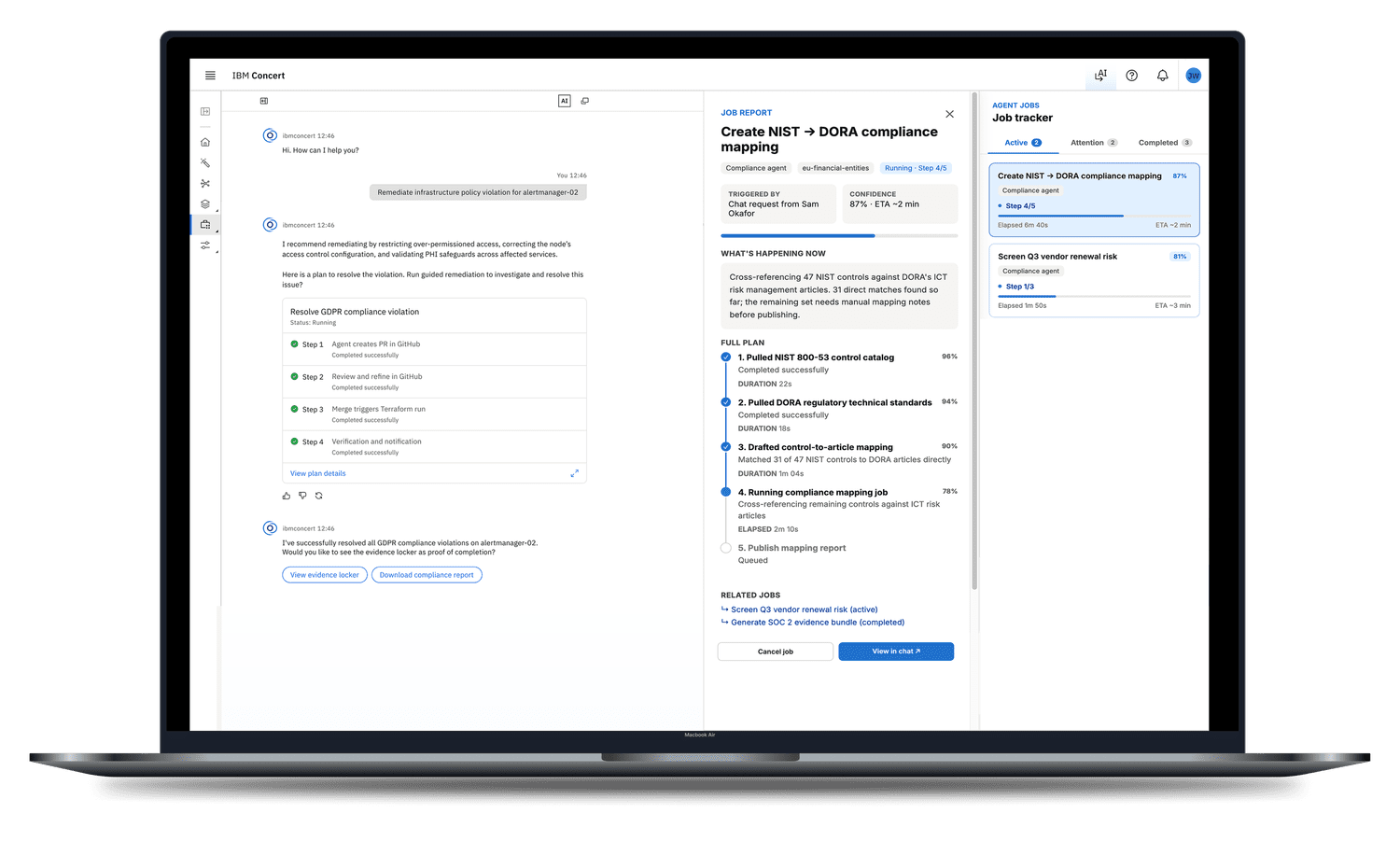
People started AI agents, walked away, and had no way to know whether the work finished, broke, or needed them.
I spotted the gap, came up with the idea, and researched the problem. Then I turned it into a prototype using AI tools, tested it with 4 SREs who use AI agents every day, redesigned it based on their feedback, and presented it to leadership.
Added to the AI product roadmap, with two partner teams now exploring the pattern and a patent case in progress.
If people can't see what an agent is doing, they stop trusting it
In conversations with people using AI agents, I kept hearing the same gap. They would start an agent, step away, and come back with no idea what had happened.
"Did it finish? Does it need me? Did it break?"
This wasn't just a missing screen. It was a trust problem. When people can't see progress, approvals, or results in one place, they only hand off work they can babysit. That defeats the whole point of AI automation.
I shared the idea with our internal AI design team. The response was strong enough that I turned it from a sketch into a real project.
One panel for all your agents, organized by what needs your attention
The tracker lives right next to the chat, where people start agent work. They can run several jobs, step away, and come back to one view instead of asking each agent for an update.
Jobs that are running now, with step-by-step progress.
Jobs paused until a person reviews and approves a step.
Finished work with results, reports, and follow-up actions.
I built a simple first version fast, then let users break it
I explored ideas in Figma and Figma Make, then built a working prototype with IBM's internal AI prototyping tool. The first version was deliberately simple. I only wanted to know one thing: does the concept make sense?
With our UX researcher, I ran moderated sessions with 4 Site Reliability Engineers who already use AI agents in their daily work.
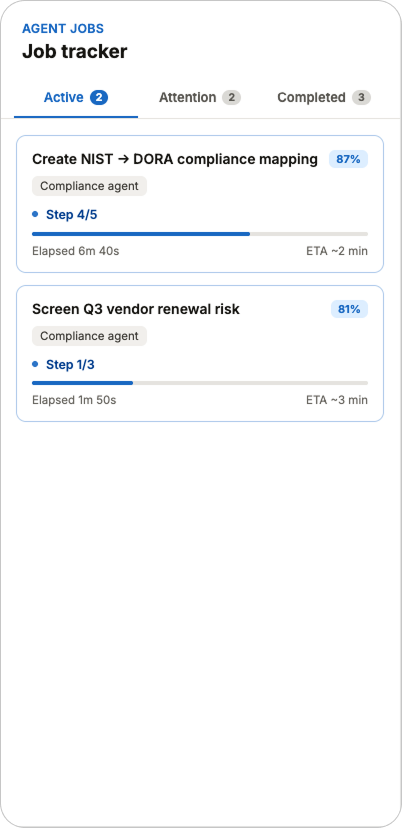
Active, v1. Running jobs with a single progress bar.
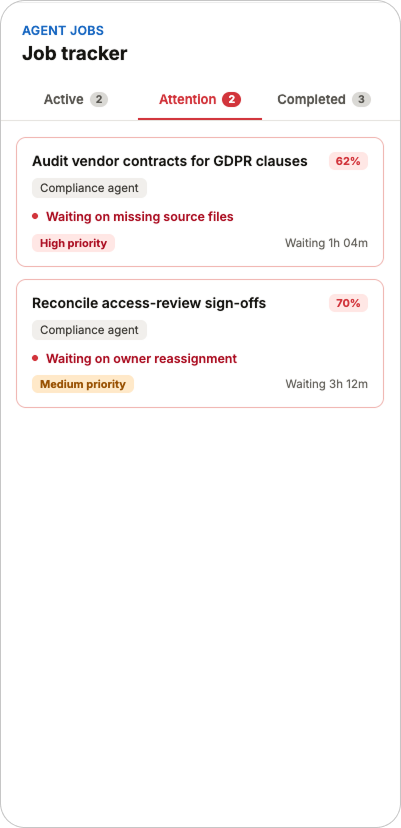
Attention, v1. Approve or reject, with a short reason.
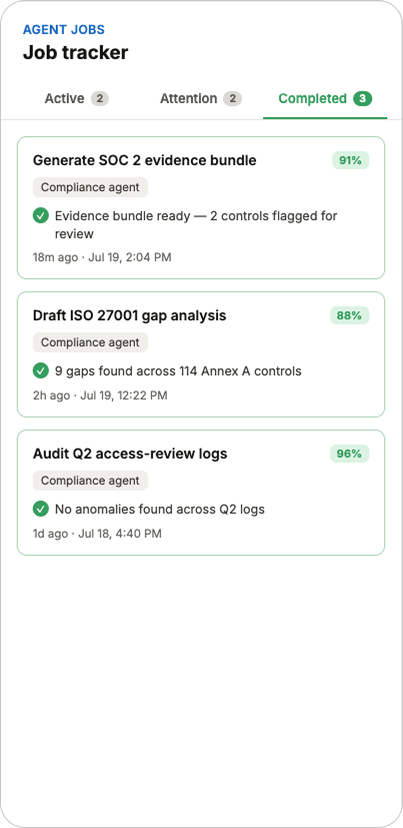
Completed, v1. Finished jobs with an agent tag and results.
Results from 4 moderated sessions with Site Reliability Engineers who use AI agents every day.
| What we tested | Result | What we learned |
|---|---|---|
| Understanding the panel | Passed | All 4 participants understood it as one place to watch their agents, and understood the three tabs without help. |
| Approving a step | Did not pass | Approve or reject was too binary. Participants didn't have enough information to decide with confidence. |
| Would they use it? | Passed | All 4 participants said they would use it, once it had richer approval details, reporting, and a pilot to prove it works. |
| Trust | Conditional | Trust was real but earned. People asked for visible steps, logs, timestamps, and proof from production. |
Every change traced back to a finding
I didn't add features because they seemed nice. Each change answered something participants asked for.
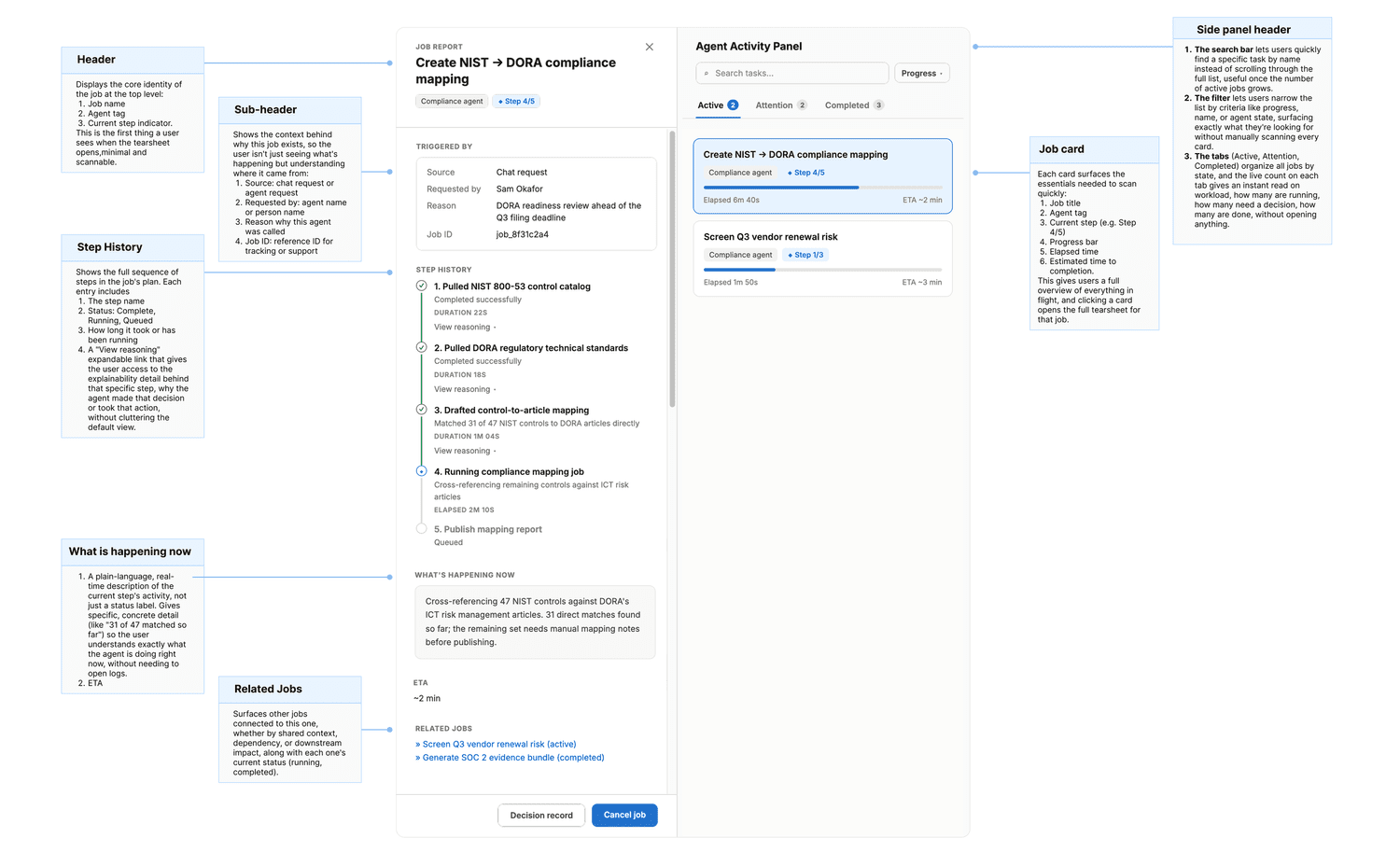
Active tab: from one progress bar to a step-by-step plan
The Active tab shows every running job with its step number (for example, Step 3 of 5), a progress bar, and a short description that updates as steps finish. Expanding a job now shows its full plan, with each step marked Processing, Queued, or Complete. This replaced the single progress bar with the step-level visibility participants asked for.
Attention tab: from two buttons to a confident decision
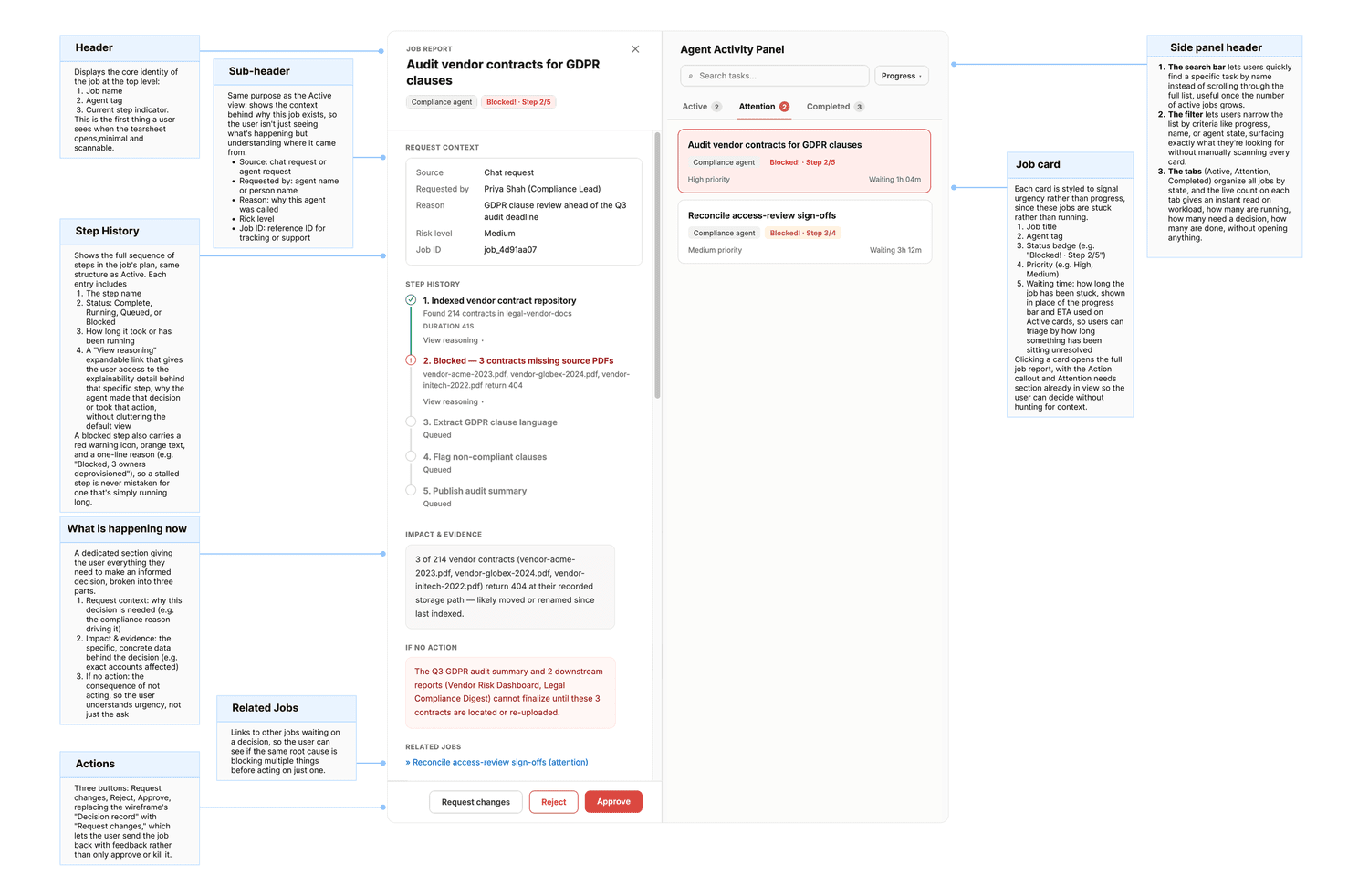
Approve or reject was too binary. Participants hesitated because they couldn't see what they were agreeing to. I replaced the two buttons with what a person needs to decide:
- Risk level (low or high) and a confidence score, so people know how careful to be
- View impact and evidence, a section people can expand before deciding
- Request changes and Add note, alongside Approve and Reject
Completed tab: a first step toward an audit trail
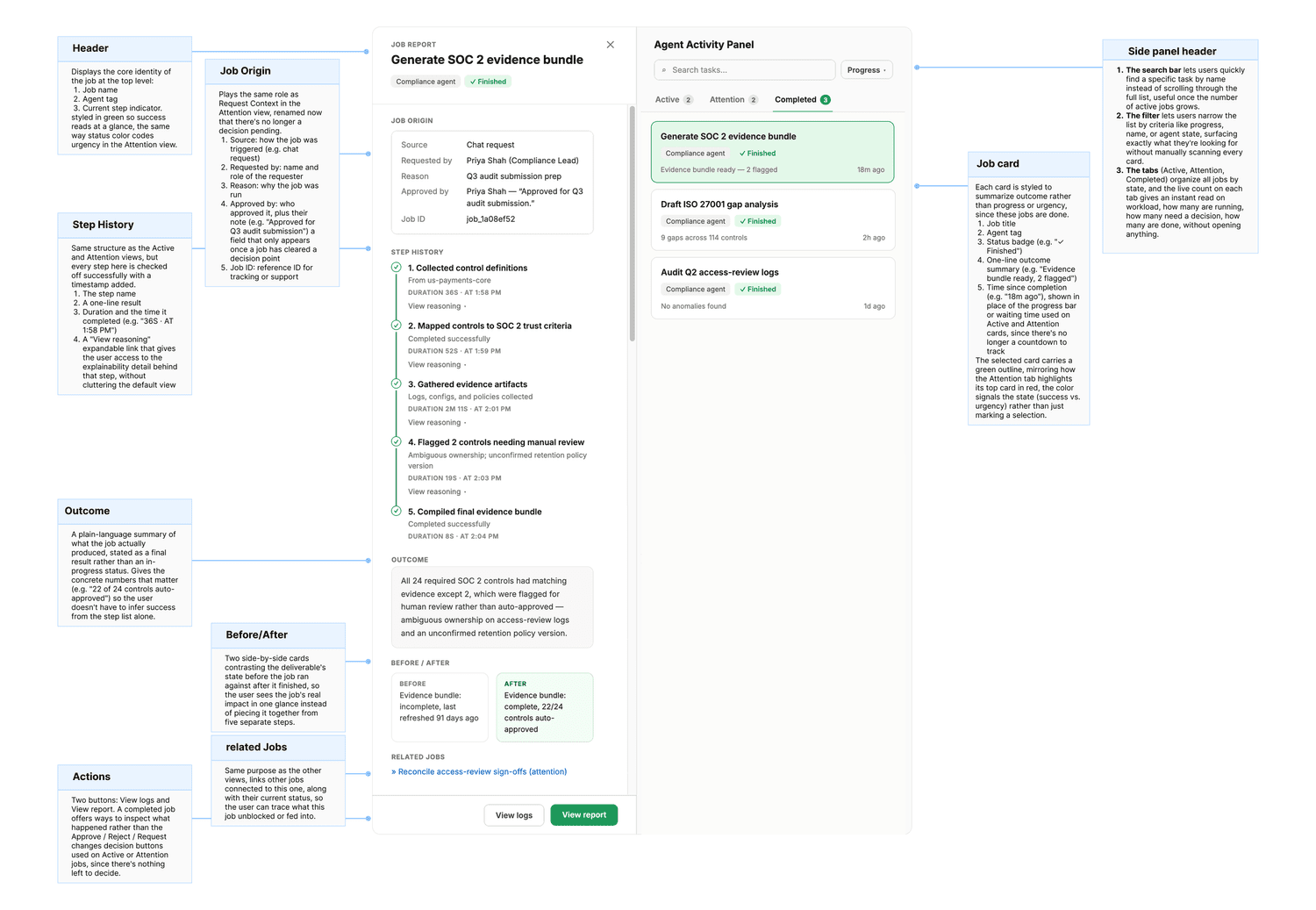
Finished jobs now show an agent and domain tag (such as Resilience, Performance, or Compliance), their final status, and direct links to View report and View in chat. This is a first pass at the audit trail research surfaced.
From a single-product idea to a cross-team opportunity
I put together a project proposal to share progress and get alignment from key stakeholders, including our AI lead product manager and AI design managers. The feedback on the direction was very positive.
The AI lead product manager had already flagged the feature as scalable and was aligning at the leadership level with a sibling AI orchestration team and a partner product team. They also moved quickly, agreeing on the spot to add the project to the AI product roadmap.
In parallel, I reached out directly to the design leads on those two partner teams. Both conversations landed well, with real interest in extending the pattern beyond a single product.
What started as a proposal for one product became an active cross-team opportunity, with conversations underway at both the design and leadership level.
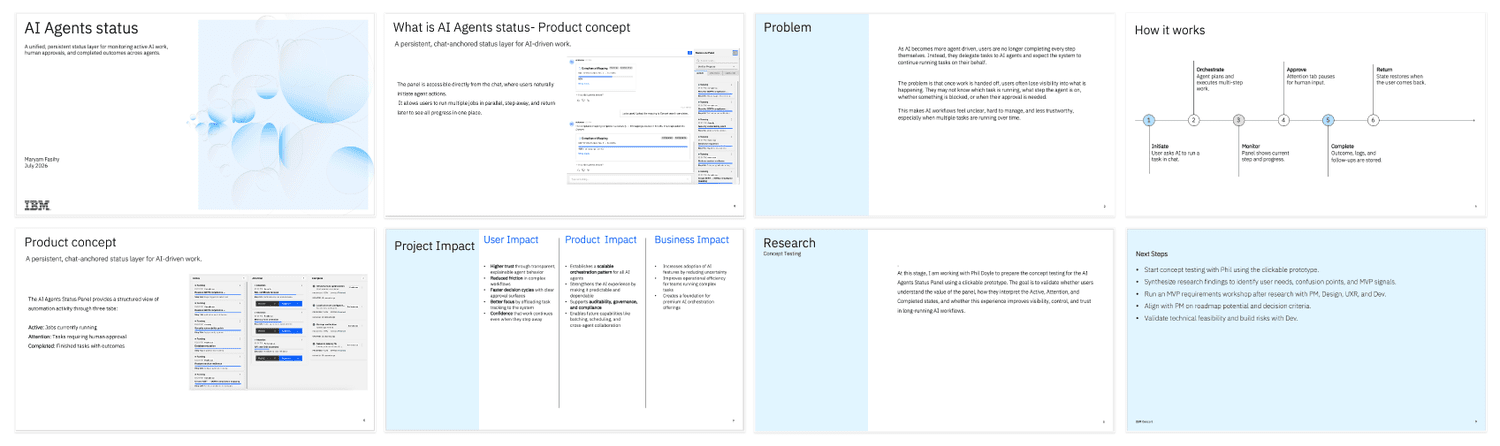
Stakeholder pitch presentation.
Start with one agent, then expand to many
The MVP launches with a single agent to prove the pattern in one contained workflow. Once it works, we expand to multiple agents in the same panel.
- One agent, tracked across all three tabs
- Step-by-step plans in the Active tab
- Approve, Reject, Request changes, and Add note, with risk, confidence, and evidence
- Agent tags, final status, and report links in Completed
- Clear messages about what the panel can act on and what it only shows
- Multiple agents tracked in one panel
- Seeing which agents work on which jobs, and how they coordinate
- Full audit trails across events
- Linking problems to their root cause
Our AI product manager pushed to narrow the MVP from many agents to just one. I agreed. Research had already validated the core pattern, so a single agent let us prove it in one contained workflow with less engineering effort. The cost was clear: we wouldn't show the "all agents in one place" value that tested well. But growing later means scaling a proven pattern, not redesigning it.
What this unlocks
The MVP is on the roadmap. These are the outcomes we're designing for and will measure after launch.
For users
Less checking in and re-asking agents for updates, and more confidence handing off multi-step work.
For the product
One reusable pattern any agent can plug into, instead of every agent building its own tracking.
For the business
Fewer trust barriers to adopting AI, and a foundation for the auditable AI that enterprise and compliance customers need.
The interface wasn't the hardest part. The loop was.
Notice a real pattern in how people work. Build just enough to test it. Let research, not opinion, decide what changes. Then use those findings as the case for the next investment. That loop took this from a design jam sketch to a roadmap item with cross-team interest.
What's next: extending the pattern to the two partner teams, designing how people see multiple agents working together on one job, and building out the patent case.